Getting started: frequently asked questions
- For
- Cashier, Manager, Administrator
- Where
- Back office, Web register, Installed register
- Permission
- No permission required
- Checked on
The questions stores ask most often while setting up Braavu POS, with a short answer and the guide that gives the steps. To do everything in order, follow the checklists instead, starting with Checklist: setting up your account and settings.
The registers
Does the register sell without the Internet?
Yes, at the installed register on the computer: it sells for cash offline, keeps each sale on the workstation and sends it to the server when the network returns. The back office's web register, however, does not sell without the server. Selling offline.
Which register should we use every day?
The web register, in Sell > Sell. The installed register is for when the Internet or the server is down: install it on each workstation anyway before opening. Installed register and web register: which one to use.
Do we need to install anything on the store computer?
Yes: the installed register, on each Windows workstation. You issue a register code in the back office, then type it when the register first starts. Installing the register on a workstation and enrolling it.
What hardware do we need?
One Windows computer per workstation, a receipt printer, a cash drawer connected to the printer, a barcode scanner and, if you want one, a customer display. The supported models are in Supported hardware.
What happens if a workstation stays without the Internet for a long time?
It keeps selling. After more than 24 hours without contact with the server, it locks and does nothing more until contact returns or a manager unlocks it; the sales already made stay on the workstation. Handling a station locked after 24 hours without contact.
The catalog and taxes
How do I enter my products without typing them one by one?
Prepare a CSV file, then import it in Catalog > CSV import and export. The import starts with a dry run that shows what will change, before anything is modified. Preparing a CSV file in Excel, Importing products from a CSV file.
How do I enter the opening stock?
With a full count of each store, before its first sale: you open it at the office, the phones send what is counted, then you close it. Running a full count.
Why does the register calculate no tax?
A new store applies no tax until you have checked its taxes. Add your taxes in Settings > Taxes, then check the store's. Setting up taxes, Setting up a store's tax.
The team and access
An employee cannot open their session at the register: why?
Most often, they do not have a PIN yet: in Team > Employees, their PIN column shows To set. After several wrong PINs, they are also blocked on that workstation until a manager unblocks them. Setting or resetting an employee's PIN.
I forgot my password
Click Forgot your password? on the sign-in screen and enter your email: a link to choose a new password is sent to you. Changing your password.
I cannot find a back-office screen
Type its name in Search for a page…, at the top of the screen, or look for it in the menu on the left (see the getting-started guide on navigating the back office). A screen your role does not allow appears neither in the menu nor in the search: ask an administrator for the permission.

How do I switch the software to English?
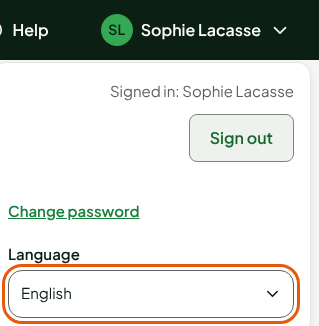
Each person chooses the back-office language in Language, in the panel that opens under their name, at the top right. The language of the register screens is a setting of the employee's record. Changing the language.
Sales
How do I correct a sale that is already paid?
A paid sale can no longer be changed. A mistake caught right away is corrected by voiding the sale, before the end of the session; otherwise, by a return linked to the original sale. Voiding a sale, Returning items and refunding.
The receipt does not print: should we redo the sale?
No. The sale is paid and recorded: fix the printer, then reprint the receipt. A customer is never made to pay twice. Handling a paid sale whose receipt does not print.