Exporting the customer list
- For
- Manager, Administrator
- Where
- Back office
- Permission
- Manage customers, Export a customer’s data
- Checked on
Exporting the customer list produces a file you open in a spreadsheet. Use it to prepare a mailing, check balances, or keep a copy. The file contains what the list shows on screen, filters and sort order included.
Before you start
- Your role must have the Manage customers and Export a customer’s data permissions. Without the second one, the Export the list button does not appear.
- The file contains personal information: names, phone numbers, emails. Keep it only as long as needed, and share it only with people who need it. The server records every export in its log.
Exporting a list of customers
To export all customers, or only those matching a filter:
Open Customers > Customer records.

For a shorter list, type part of the name, phone number, or code in Search for customers. At least 2 characters.

If you need to, choose a Customer group or a Store. All groups and All stores leave no one out.

Choose the order in Sort by, for example Name A→Z. The file follows the same order.

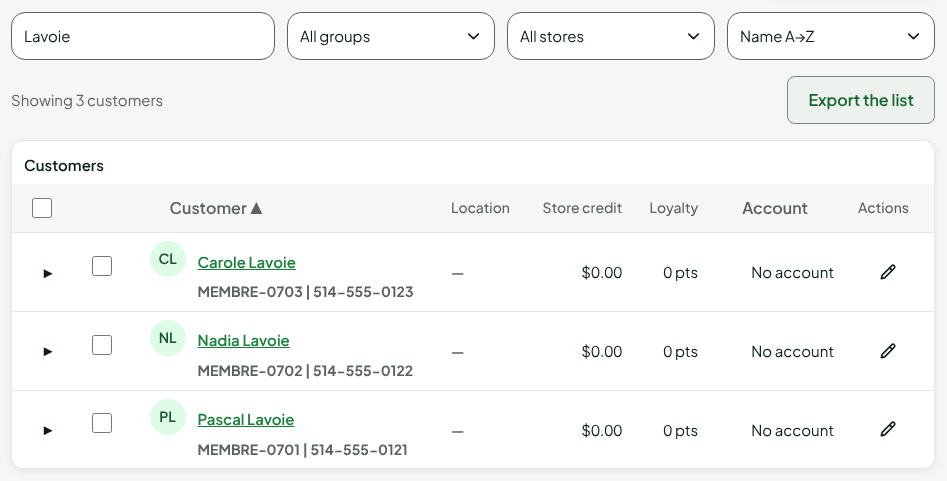
Check the count, Showing 3 customers, then click Export the list.

The browser saves the file, with no other window. Its name is clients- followed by the date in universal time (UTC), for example clients-2026-11-14.csv. In the evening, this date can be tomorrow's.
The export follows the filters and the sort order, not the ticked boxes. Ticking customers in the list does not shorten the file.
Reading the file
The file is a UTF-8 CSV: a spreadsheet reads it with its accents. Fields are in quotation marks and separated by semicolons; the first line is the header, always in French.
| Column | Content |
|---|---|
| Nom | The record's display name (first and last name, or company) |
| Téléphone | The record's phone number, empty if there is none |
| Courriel | The record's receipt email |
| Code client | The customer code |
| Groupe | The group name, empty if the customer has none |
| Points | The loyalty point balance, as a whole number |
| Crédit boutique | The store credit balance in dollars, with a period: 0.00 |
| Solde du compte | The B2B account balance in dollars, empty if the customer has no account |
| Créé le | The date and time the record was created, in universal time (UTC) |
The file does not contain the address, the note, or the consents. For everything the software knows about a customer, see the record export in the guide "Reading a customer record".
If your spreadsheet shows everything in a single column, tell it the separator is the semicolon.
Troubleshooting
"Too many customers to export: add a filter to shorten the list."
The list is longer than a file can hold. Add a filter (a group, a store, a search text), then export again.
"Your role does not allow exporting customer information."
The Export a customer’s data permission is missing. Ask an administrator for it.
"The list could not be exported."
The server did not answer. Click Export the list again.