Handling a station locked after 24 hours without contact
- For
- Cashier, Manager
- Where
- Installed register
- Permission
- Unblock a blocked register (24 h)
- Checked on
The sales already made on the station are safe: they stay on the station and will go to the server when the network is back. But a station that has gone more than 24 hours without contact with the server locks and does nothing more, until contact is back or a manager unlocks it.
What you see
Before the lock, the register header warns: Locks in 1 h 30 without server contact, for example. This is the time to restore the Internet or tell a manager.

Once locked, the station shows only the Station locked screen: the time since the last contact and the unlock form. The header shows Station locked in red.
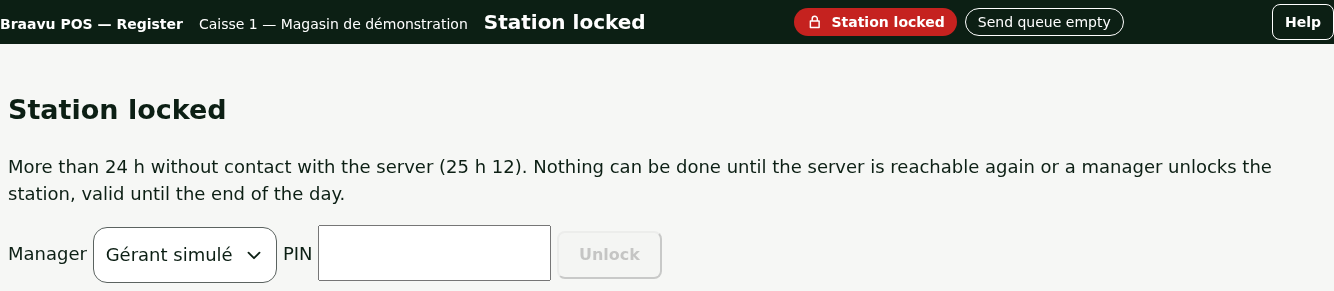
A locked station does nothing at all: no sale, no return, no register closing, no cash out, no drawer opening, no printing. Sales already made are not affected.
What to do
Two ways out: contact with the server comes back, or a manager unlocks the station.
Restoring contact with the server
Check the store's Internet connection (cable, router). As soon as the station reaches the server, it unlocks by itself and sends what it holds: nothing to do at the register.
Having a manager unlock the station
If the Internet does not come back, a manager unlocks the station on site, with their own PIN:
Choose their name in Manager.

Type their PIN in PIN. It is not displayed.
Click Unlock.

The station works again: sales, returns, closing. The header shows Unlocked by a manager until midnight.

The unlock lasts until the end of the day, midnight store time. The manager menu shows it, under Station 24-hour lock.

If contact is still not back at midnight, the station locks again; a manager can unlock it for the new day. As soon as the server answers, no unlock is needed.
Only a manager who has the permission to unblock a station and a PIN on this station appears in the Manager list. Every attempt is recorded, successful or not, and sent to the server with the manager's name; the PIN itself is written nowhere.
What not to do
- Do not type PINs at random: each failed attempt is recorded and sent to the server.
- Do not change the computer's time: it unlocks nothing.
- Do not turn off the computer, reinstall the register or delete anything: the station's sales waiting to be sent are kept there.
- Do not lend your manager PIN: the unlock is in your name.
When to call an administrator
- The Manager list is empty: no manager of this station can unlock it. The station waits for the server; call an administrator.
- Your PIN is refused although you are sure of it: give the administrator the station's name (at the top of the screen) and your name.
- The Internet is back and the station stays locked.