Handling a register that no longer starts
- For
- Cashier, Manager, Administrator
- Where
- Installed register
- Permission
- No permission required
- Checked on
The sales already made on this station are kept: even when the register refuses to start, they stay on the computer, and an administrator knows how to recover them. What would put them at risk is deleting anything, or reinstalling the register when the screen does not ask for it.
What you see
Instead of the sign-in screen, the register shows This station cannot start, with the cause in a red banner and the instruction: Do not delete the register data and do not reinstall anything (except when the cause is an update to install: see below).
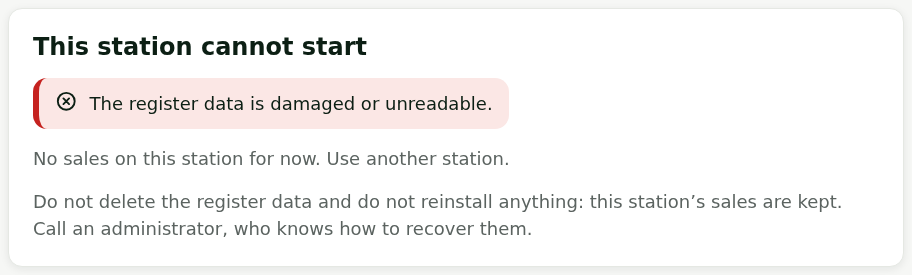
The cause changes from one failure to another. Two of them can be solved on site:
the message asks to restart the computer, then reopen the register;

the message asks to install the update: the register was opened by a newer version than the one installed.

The other causes need an administrator, for example:


What to do
Keeping on selling elsewhere
The screen says so: No sales on this station for now. Use another station.
- Sell on another station of the store, or at the back office web register if the Internet works.
- Leave the failed computer on, as it is.
Restarting the computer, if the message asks for it
- Restart the computer from the Windows Start menu.
- Reopen the Register app.
If the screen comes back, call an administrator; the screen says it again: delete nothing and reinstall nothing in the meantime.
Installing the update, if the message asks for it
The installed register is older than the one used on this station. The screen says so: Nothing is lost. Have an administrator install the latest version of the register over this one; never install an older version, and do not uninstall anything. This is the only cause where installing something is the right answer: for the others, a reinstall repairs nothing.
If the register starts but refuses to sell
A banner Update required to sell says that the installed version is too old. Selling waits for the update, but sending the sales already made goes on: nothing is lost.

What not to do
- Do not delete the register data and do not empty any folder of the computer.
- Do not uninstall the register, and do not reinstall it unless the screen asks for the update (over it, by an administrator).
- Do not copy another station's data onto this one, and do not restore an old backup of the computer.
- Do not take the disk away or replace the computer before the administrator: the unsent sales are kept there.
When to call an administrator
As soon as the screen This station cannot start stays after a restart, or if its cause asks for neither a restart nor an update. The administrator follows a recovery procedure reserved to them. Give them:
- the name of the station and the store;
- the message in the red banner, word for word (a photo of the screen is enough);
- what happened just before: power cut, update, computer moved.