Checklist: selling
- For
- Cashier, Manager
- Where
- Web register, Installed register
- Permission
- Sell at the register, Process a return and refund, Void a sale, Cash in or cash out, Close the register
- Checked on
Before opening, each person who runs the register should have done a day's tasks at least once: open the register, sell, take payment, return an item, close, and know what to do when the Internet is down. Check off this list during training: each line points to the guide that does the task.
Before you start
- Settings, the catalog and employee records are ready (Checklist: setting up your account and settings, Checklist: setting up your catalog and customers).
- Each employee who sells has their personal PIN.
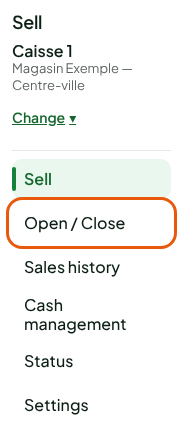
- The web register's tasks are in the back office's Sell menu.
Opening the register
- ☐ Know which register to use: the web register every day, the installed register when the Internet is down. Installed register and web register: which one to use.
- ☐ Choose the counter's register, once per browser: Making a sale, section "Choosing your register".
- ☐ Count the cash float and open the register, in Sell > Open / Close: Opening a register.
- ☐ At the installed register, open your session with your PIN, and switch employees: Signing in to the register with your PIN and switching employees.
Selling

- ☐ Tour the Sell screen: Finding your way around the Sell screen.
- ☐ Make a cash sale from start to finish: Making a sale.
- ☐ Add the customer to the sale: Adding a customer to a sale.
- ☐ Give a discount, apply a coupon: Applying a discount to a sale, Using a coupon at the register.
- ☐ Depending on your business: Selling a weighed product, Selling a product with a deposit, Applying a tax exemption to a sale.
- ☐ Set a sale aside to serve the next customer, or empty it: Putting a sale on hold and resuming it, Emptying the cart or abandoning a sale.
- ☐ Have a manager approve a task: Getting a manager's approval.
Taking payment
- ☐ Take cash, with rounding to 5 cents: Taking cash payments and rounding to 5 cents.
- ☐ Split a payment between several methods: Splitting a payment between several methods.
- ☐ Take a gift card, points or store credit: Selling and redeeming a gift card, Earning and redeeming points at the register, Issuing and using store credit.
- ☐ Print, reprint or email the receipt: Printing, reprinting or emailing a receipt.
After the sale

- ☐ Find a sale by its receipt number, in Sell > Sales history: Finding a sale in the history.
- ☐ Make a return, an exchange, or void a sale of the session: Returning items and refunding, Exchanging an item, Voiding a sale.
- ☐ Depending on your business: Creating and managing layaways, Taking and handing over a special order, Handing over an order for pickup, Selling on a customer's account.
A paid sale can no longer be changed. A mistake is corrected by a return, linked to the original sale, or by voiding a sale of the open session.
Cash and closing
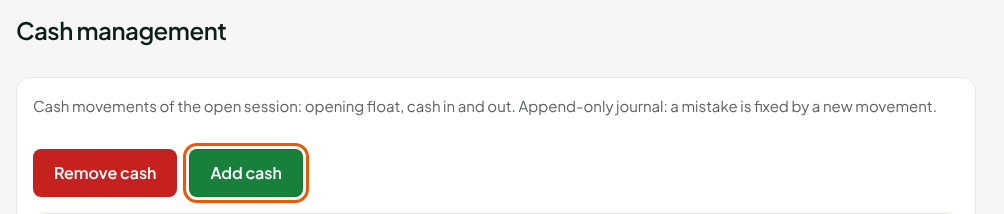
- ☐ Record cash in or cash out, in Sell > Cash management: Cash in and cash out.
- ☐ Read the register's state when a sale does not go through or a receipt does not print: Reading the register status.
- ☐ Count the drawer and close the register at the end of the day: Closing a register and counting the drawer.
When the Internet is down

The web register does not sell without the server. The installed register on the computer keeps selling for cash, keeps each sale on the workstation and sends it when the network returns.
- ☐ Switch to the installed register and sell there: Handling an offline register, Selling offline.
- ☐ Know which returns go through without the network: Offline returns: what is allowed.