Understanding the variances of a closing
- For
- Manager
- Where
- Back office
- Permission
- View reports, All sales at assigned stores
- Checked on
When a register is closed, Braavu POS compares what the register should contain with what was counted. The difference is the variance. This guide explains where these figures come from and how to read them in the summary of a closing.
A closing is never reopened or changed. A correction that arrives after the closing, such as a sale made offline that reaches the server later, is added beside it as an adjustment linked to that closing: the original variance stays as it was counted.
Before you start
This guide follows the "Cash closings" report (guide Cash closings). You need a closing to read, preferably one with a variance.
Reading the variance of a closing
To find a closing that has a variance, then read its variance:
Open Reports > Cash closings, check Variances only, then click Show report.
Click View, in the row of the closing.

Read the Payments block of the summary, Variance column.
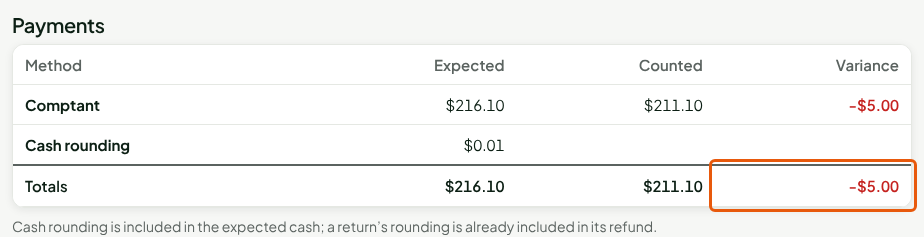
The variance is Counted minus Expected. A negative amount is a shortage: money is missing from the drawer. A positive amount is an overage. In the example, $211.10 counted minus $216.10 expected gives -$5.00.
Knowing where the expected amount comes from
Expected is what the drawer should hold if everything was done without error. To rebuild it:
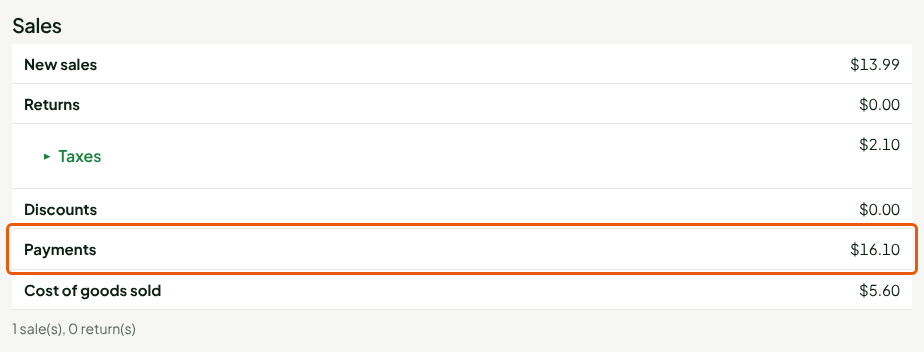
Read the Sales block of the summary: the Payments line gives what customers paid during the session.
Read the Cash movements block: the Opening float is the money that was in the drawer at opening.
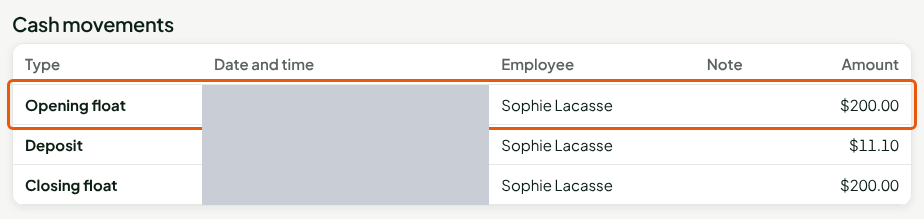
Expected cash is the opening float, plus the cash received from sales, minus the cash given back for returns, plus cash in and minus cash out during the session. Deposits and balances collected for layaways and special orders count too. In the example: $200.00 + $16.10 = $216.10.
Counted reads from the other side: the Closing float (what stays in the drawer) plus the Deposit (what goes to the bank). Here, $200.00 + $11.10 = $211.10.
Cash rounding is included in the expected cash. Cash payments are rounded at the register; the line shows it separately, without adding it a second time. The rounding of a return is already included in its refund.
Reading the variance reason
When there is a variance, the person closing must give its reason. The reason shows in the summary, with the notes of the session.
Read the Variance reason block.

If a manager approved the variance, the block says so under the reason. With no variance, the block shows "No variance to explain."
Understanding a method that is "not counted"
Cash is always counted. Another method is counted at the drawer only if the business set it to "Counted at register closing", under Settings > Payment methods. By default, card, gift card and store credit are not counted; set to "Counted at register closing", they are counted like cash. To see such a method:
Open the summary of a closing where customers paid by card.
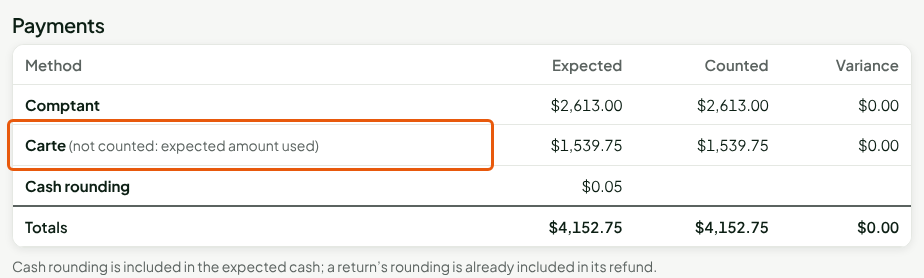
For this method, Counted repeats the Expected amount, the variance is $0.00 and the line carries the note "not counted: expected amount used". Without it, the columns would not add up: you would read a variance that does not exist. Totals follow the same rule, so Counted minus Expected gives Variance on every line.
The "Cash closings" report does the same, with a note under the table.

This display does not change any closing: the recorded closing keeps these methods as not counted.
A closing made by an administrator
An administrator can close a register left open on a revoked device. If nothing was counted, the cash line shows Not counted and no figure for the variance: nobody counted, and no expected amount is repeated for its methods. In the report, the row of this closing stays "Not counted", and its expected amount is included in the Total row. The closing carries the reason given by the administrator.
Troubleshooting
I want to correct a closing
A closing is not corrected: the variance stays, explained by its reason. What arrives afterwards is added beside it, as an adjustment linked to the closing.
A sale arrived after the closing
It appears in the Adjustments received after the closing block, between the cash movements and the variance reason. This block shows only if there is at least one adjustment. The variance of the closing does not move.