Reading the register status
- For
- Cashier, Manager
- Where
- Web register
- Permission
- Sell at the register
- Checked on
The Status screen tells you at a glance whether the web register is able to sell: the connection to the server, the printing hardware, what is waiting to be sent. It re-reads itself every 15 seconds. Open it when a sale does not go through or when a receipt does not come out.
Before you start
- The screen reads the state of the chosen register: if you have a choice, Change in the Sell menu reopens the list of registers.
- It changes nothing: it is a reading, except Test the printer, which prints a test receipt.
Open the status
To read the register's state:
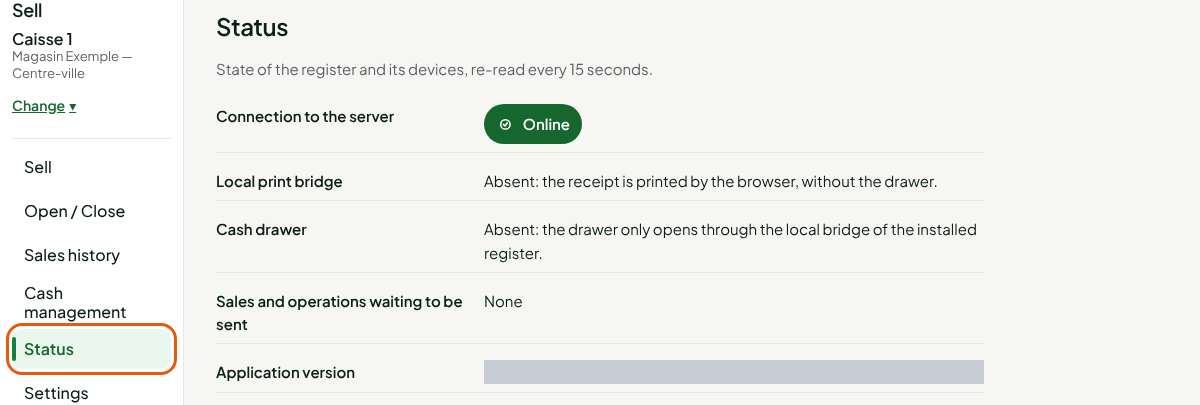
Open Sell > Status.
Read each line
Connection to the server
Online: the web register talks to the server and can sell.

Offline: the line reads "Offline — no sale goes through. Open the backup register." The web register does not sell without a connection. Switch to the computer's installed register, which sells offline (Handling an offline register).

Local print bridge and cash drawer
The local bridge is what connects the register to the receipt printer and the drawer.

- Local print bridge: Present, or Absent. Without the bridge, the web register's receipt is printed by the browser, without the drawer.
- Cash drawer: Wired to the printer through the local bridge, or Absent. Without the bridge, the drawer only opens through the installed register.
To connect this hardware: Setting up the receipt printer and Connecting the cash drawer.
Sales and operations waiting to be sent
None: nothing is waiting. When a sale, a held sale or a session operation is waiting for a decision, the line says to settle in the "Sell" screen with the number: open Sell and settle them. If the register is not taken in the tab, the line says so: "Register not taken in this tab: no sale or operation is waiting here. The cash session itself may still be open."

Application version
The version of Braavu POS that this browser has loaded. Give it to support when you report a problem.
Test the printer
To print a test receipt, with no sale and no amount:
Click Test the printer.

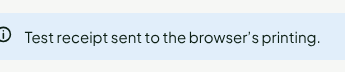
The browser's print window opens, and the screen confirms: Test receipt sent to the browser's printing.
The drawer never opens for a test, and the test receipt carries no sale and no amount.