Working the register: cashier's quick guide
- For
- Cashier
- Where
- Web register, Installed register
- Permission
- Sell at the register, Process a return and refund, Void a sale, Close the register
- Checked on
Everyday tasks, one per line, at both registers. Print this page and keep it next to the register: each task points to its full guide.
Before you start
- The web register, in the back office's Sell menu, is the everyday register. It only sells online.
- The installed register, the Register application on the computer, also sells without the Internet.
- Everyone sells under their own name. Your PIN is yours: never give it to anyone.
At the web register

| Task | How | Guide |
|---|---|---|
| Open the register | Sell > Open / Close: count the float, then Open the register. | Opening a register |
| Sell | Sell > Sell: scan the item, or type it in Search products. | Making a sale |
| Take payment | Pay, Cash, the amount in Amount handed over by customer, Enter. Then Finish and print. | Making a sale |
| Put on hold | Put on hold, above the cart, then Confirm the hold. To resume it: Resume a sale. | Putting a sale on hold and resuming it |
| Empty the cart | The Empty the cart trash can, above the cart. | Emptying the cart or abandoning a sale |
| Return | Sell > Sales history: the receipt number, Return items, then refund. | Returning items and refunding |
| Exchange | Like a return, then add the new item and click Refund, then collect. | Exchanging an item |
| Void a sale of the session | More actions…, Void a sale, the reason, then Void the sale. | Voiding a sale |
| Close the register | Sell > Open / Close: count the drawer, then Close the register. | Closing a register and counting the drawer |
A paid sale can no longer be changed: a mistake is corrected by a return, or by voiding a sale of the open session.
When the Internet is down: the installed register
The web register stops, but the register always sells: switch to the Register application on the computer (Handling an offline register).
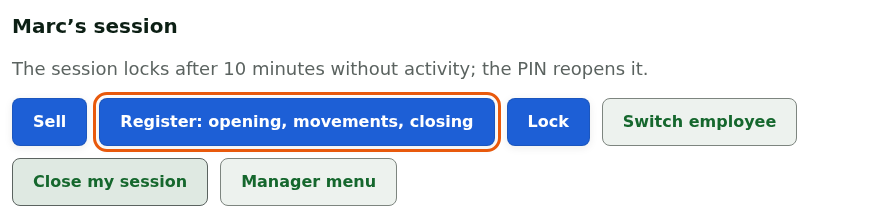
| Task | How | Guide |
|---|---|---|
| Open your session | Your name under Who is taking the station?, your PIN, then Open the session. | Signing in to the register with your PIN and switching employees |
| Open the register | Register: opening, movements, closing: count the drawer, then Open the register. | Opening a register |
| Sell and take payment | Sell, scan the items, Pay, the amount in Amount received, then Take payment. | Selling offline |
| Empty the cart | More actions, then Cancel the sale. | Emptying the cart or abandoning a sale |
| Return | Only for a sale from this workstation never sent to the server; the others wait for the network. | Offline returns: what is allowed |
| Go back to the web register | Return to the web register when the notice appears, then count the drawer and Close the register. | Installed register and web register: which one to use |
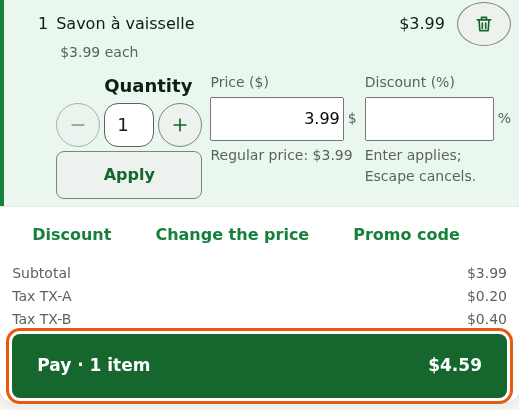
Offline, take cash: gift cards, store credit and points wait for the network. Never make a customer pay twice: a paid sale is recorded on the workstation, even if the server has not received it yet.