Store credit offline: what is allowed
- For
- Cashier, Manager
- Where
- Installed register
- Permission
- Sell at the register
- Checked on
The register always sells, even without the Internet. But store credit is not allowed offline: the register refuses it, and the sale is settled with another payment. This guide says what you see at the installed register and what to offer the customer.
What the register allows offline
| Action | Offline |
|---|---|
| Sale paid in cash | Yes |
| Payment by card | No: the sale is settled in cash |
| Payment with store credit | No |
| Payment with a gift card | No |
| Giving credit back to a customer after a return | No: the refund waits for the network |
| Creating or paying a layaway | No |
| Return of a sale from this register that was never sent to the server (with no send attempt) | Yes, refunded in cash |
| Any other return | No: online only |
Store credit is a value shared by every register in the business. Spending it is therefore always checked at the server. Never work around this refusal: offer another payment.
Knowing the register is offline
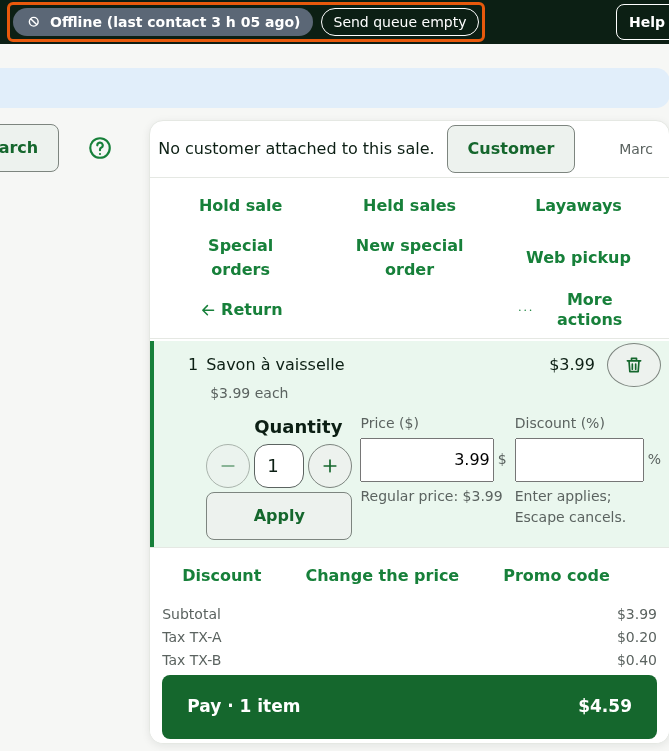
The register's status shows at the top of the screen: Offline, followed by the last contact with the server, and the Send queue of sales waiting for the network to return. Sales made offline are sent on their own once the server answers.
Looking up a customer offline
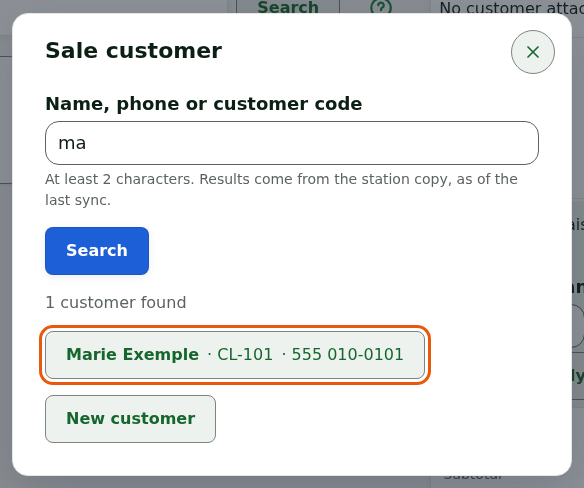
Customer search runs on the register's copy. It works without a network, but it only gives the customer's name, phone, and code.
Click Customer, above the cart.
Type at least 2 characters in Name, phone or customer code, then click Search.
Click the customer found.
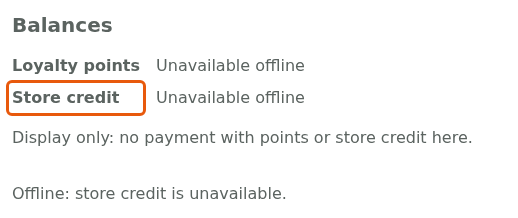
The record shows Unavailable offline next to Store credit, and the notice Offline: store credit is unavailable. The register shows no balance, and there is no point promising one to the customer.
You can still click Attach to the sale: the customer earns their points when the sale is received. Creating a new customer needs the server: the screen says "Offline: creating a customer needs the server. Try again when the network is back."
Offering another payment
On the Pay screen, store credit and gift card show Offline: offer another payment (cash). Card shows Offline: card is refused. Offer another payment. Any other method the business has not declared acceptable without the Internet is greyed out, with the tooltip Offline: this method is not accepted without the Internet. Nothing is held and nothing is charged.
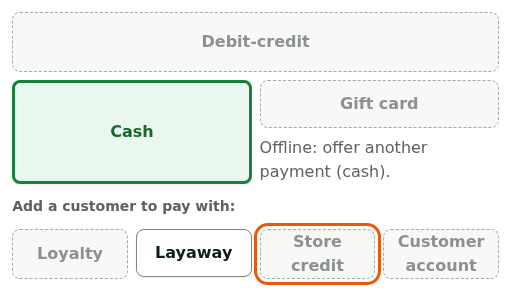
Tell the customer the credit cannot be used right now.
Click Cash and take the sale in cash.
The customer's credit is untouched: they can spend it on a later sale, online. If the customer prefers to wait, they can come back once the network is restored.
An administrator can accept other payment methods without the Internet, in Settings > Payment methods (the Accepted without Internet box). That box never exists for card, store credit, or gift card.
Making a return offline
An offline return is allowed only for a sale made on this register and never sent to the server (with no send attempt). It is refunded in cash.
Click Return, type the Receipt number, then click Find the sale.

Remove from the list the items the customer keeps, then click Refund. A cashier who may not refund has the refund approved by a manager, with their PIN.
A sale paid in store credit, even in part, cannot be returned offline. The screen says: "Server unreachable: this sale was not paid in cash only. A card, a gift card or store credit need the server: try again when the network is back." Ask the customer to come back.
Troubleshooting
"Offline: store credit is unavailable."
The register cannot reach the server. Offer another payment or wait for the network to return.
The network is back, but the credit stays unavailable
As long as the register's status says Offline, the server is not answering. Wait for the status to change, then reopen the customer's record. If nothing changes, call an administrator.